5 minute read · Practical field guide
1. Appointment coordination
A software demo, maintenance visit or account check-in often needs a simple confirmation. Text can give the recipient a compact request they can answer between other tasks. Include the business, date, time and the action you need.
Example draft: “Hi Jordan, Ellis at Summit Service. Can we confirm the equipment check for Thursday at 10 a.m.?” These examples use fictional names. Send them in an appropriate existing conversation, and update the appointment record when the answer changes the arrangement.
2. Delivery and collection details
A supplier may need to confirm a receiving window, collection time or the correct business entrance. This is a practical use for a short two-way exchange because the answer can prevent a small misunderstanding from holding up the work.
Keep it specific: “Is your warehouse receiving team available between 1 and 3 p.m. tomorrow for order 218?” Make sure the reply reaches the person planning the delivery. A useful message is one whose answer is actually incorporated into the schedule.
3. One missing detail
Before preparing a quote or sample, ask for the one detail that prevents the next step. That could be a product size, the number of locations or a preference between two appointment times. A focused question is easier to answer than a vague request to get in touch.
Keep the formal specification and commercial documents in the agreed system. The text can resolve an input and point to the next step, while the detailed record remains available to the people who need it.
4. A requested callback or service update
If a customer has asked for a call, text can help establish a convenient time. It can also provide a brief, accurate update when someone is waiting on your team. Identify the owner and make only commitments the business can keep.
SMS is a sensible option when plain text is enough. A supported iMessage workflow can add richer conversation features when they serve the task. Start with one use case, a monitored inbox and contacts who welcome the channel. Compare providers after you can describe the exchange you want them to support. That gives a long directory a practical purpose.
Group the work before grouping the brands
Business texting products often appear in the same search results while solving different problems. A shared inbox helps people work together on conversations. A CRM connector brings messaging into an existing customer record. A programmable API supplies building blocks for a custom application. Some offerings combine these layers, but the category names are still useful for describing what your team needs.
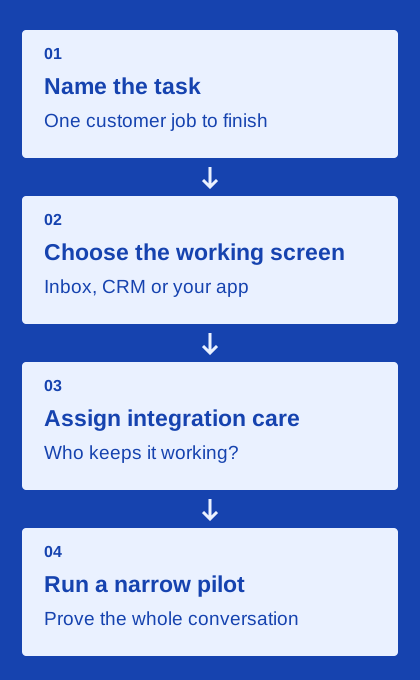
Start with a task such as confirming collection, answering a requested quote question or coordinating a service visit. Name the screen where staff should work and the system that owns the outcome. Then compare products that can support that arrangement. A technically capable API may be a poor first purchase for a team without an integration owner; a polished inbox may be insufficient for an application that needs controlled event processing.
Use ordinary exceptions to narrow the list
Write down three things that can go wrong in your chosen task. The customer replies after hours. Two orders match the same number. A scheduled reminder becomes stale after a phone call. Ask how each shortlisted product handles those situations in the intended plan. This is more revealing than comparing a long checklist of features you may never use.
Keep the answer attached to its evidence: a documentation page, a written commercial clarification or a result from your own configured test. An advertised integration is a useful lead, not proof that the exact fields and routing you require are supported. When an answer remains unclear, preserve it as a buying question rather than converting the uncertainty into a positive or negative rating.
Check the channel independently of the workflow
The same staff workflow can sit on different messaging channels. Apple distinguishes iMessage, RCS and SMS/MMS, with capabilities and availability that vary by setup. A business API described as an iMessage service is not automatically equivalent to every other Apple business messaging route. Ask the provider what actually sends the message, what account or device arrangement is required and what happens when the preferred channel is unavailable.
For a customer, a usable next step matters more than an internal product category. Test the message, link or attachment on the actual routes your audience is likely to use. Keep fallback behavior explicit: whether it exists, what it costs and how it affects the reply thread. Do not assume one successful iPhone example establishes the experience for every recipient.
Write a shortlist that another buyer could audit
A useful shortlist records the use case, required channel, working screen, integration owner, expected volume and unresolved questions. Put the quoted plan next to each candidate so an entry price is not mistaken for the cost of the necessary features. Separate recurring software charges from usage and setup work. This makes tradeoffs easier to discuss without declaring a universal winner.
Finish with a narrow pilot for the strongest candidates. Use the same ordinary task and the same exception cases so the comparison is meaningful. Note what you observed and what you did not test. This directory is published by the team behind Miss Blue, so the ownership relationship remains relevant when reading our reviews. Use the linked primary sources and your own requirements to make the final purchase decision.