4 minute read · Practical field guide
Begin with the person who has to answer
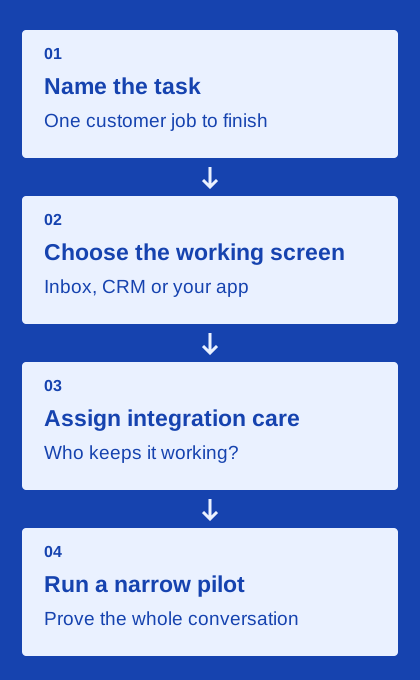
Imagine a customer replies to an order update with a changed delivery request. Where should that answer appear, who should see it and where should the delivery plan change? These questions identify the product layer you need more clearly than a search for the “best texting platform.” Start with one recurring customer task and trace it through to a finished business outcome.
If staff mainly need to read, assign and answer conversations together, an inbox may be the right starting point. If they already manage every request in a CRM, a connector may avoid a second working queue. If your application owns the process, an API may fit. These are editorial categories, not mutually exclusive technical standards; an individual provider can offer more than one layer.
Choose a CRM connector when the record drives the work
A CRM connector is attractive when staff already work from contacts, orders, appointments or opportunities. Evaluate where outgoing activity is written, how incoming replies match records and which owner receives the next task. A screenshot showing a sent text in a timeline does not establish that ambiguous replies, changed contacts or duplicate records are handled correctly.
Use your exact CRM and intended objects in the test. A connector may support contacts but not the custom order object your team relies on, or its required automation may be available only in a particular plan. Ask who maintains field mappings after launch and how failures become visible. Integration convenience is useful only while the resulting records remain accurate enough for staff to trust.
Choose an API when your application owns the experience
A messaging API provides a way to build sending and receiving into your own software. The surrounding application still needs to manage identities, business state, events, errors and human support. Budget for that work and name the person responsible for maintaining it. A low transport rate does not represent the full cost of a custom customer-facing workflow.
Review authentication, inbound event verification, status semantics, duplicate handling and recovery from uncertain sends in the provider’s documentation. Then test those behaviors in your own integration. An API can support a tailored experience, but flexibility creates implementation responsibilities. If no one can own those responsibilities yet, a hosted pilot may be a more practical way to learn the workflow before commissioning a custom build.
Check channel, price and operating model separately
After choosing the product layer, verify the messaging channels. SMS, MMS, RCS and iMessage have different technical and commercial characteristics. Ask about required devices or accounts, number arrangements, fallback, media and incoming replies. Keep vendor descriptions of channel support distinct from claims about business outcomes such as conversion or reply rates.
Build a quote worksheet using the same scope for every candidate: staff, lines, estimated usage, setup, integrations and support. Include any customer-operated infrastructure or maintenance obligation. If one product quotes per line and another per segment, translate both into a plausible monthly workload before comparing. Keep unconfirmed charges and capabilities visible so a neat-looking total does not hide an incomplete proposal.
Use the decision helper to start a testable shortlist
The tool below asks where your team should work and whether someone can maintain an API integration. Its rules are deliberately simple and visible: the working screen determines the starting category, while an application workflow without development support points to a hosted pilot. It does not rank brands, collect requirements or establish that a provider supports your chosen channel.
Take the suggested category and select a small number of candidates from the directory. Give each the same practical test: one expected outgoing message, one ordinary reply, one changed request and one failure or ownership exception. Record the result and the exact plan used. The best next step is a shortlist you can explain with evidence, including any limits that remain unresolved.